DaVinci Resolve 21 Photo Tools challenges Lightroom and Photoshop
Quick Reads
- Blackmagic unveiled DaVinci Resolve 21 at NAB 2026 with a brand-new dedicated Photo page.
- The Photo page supports native RAW files from Canon, Fujifilm, Nikon, Sony, and iPhone ProRAW.
- Most features, including RAW editing and tethered shooting, are free, only two AI tools require the $295 Studio upgrade.
- Lightroom catalog imports are supported, making migration from Adobe easier.
- Critics praise the color tools but note a learning curve and missing features like Lightroom’s Clarity slider.
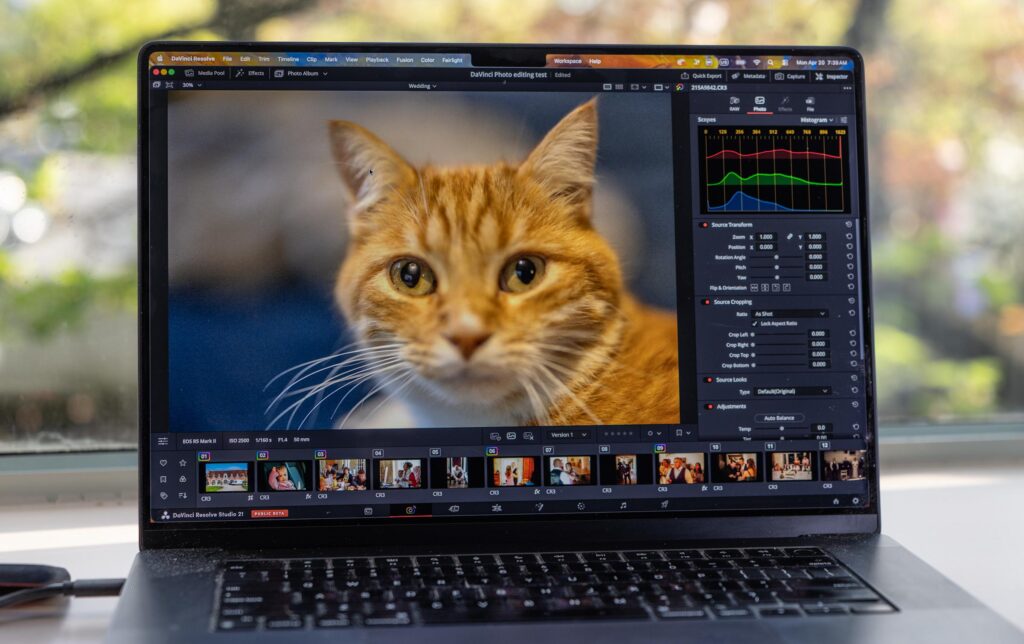
Blackmagic Design has stunned the creative industry with a bold new move. At NAB 2026, the company unveiled DaVinci Resolve 21, introducing a dedicated Photo page that brings Hollywood-grade color tools to still photography for the first time.
The DaVinci Resolve 21 Photo Page is a direct shot at Adobe. Many creators have already switched from Adobe Premiere to DaVinci Resolve. Now, Blackmagic is going after Lightroom and Photoshop too.
The Photo page includes native RAW support for Canon, Fujifilm, Nikon, Sony, and even iPhone ProRAW. That is a serious lineup for a first release. All image processing takes place at source resolution, and every adjustment preserves the full quality of the original file, essentially non-destructive editing.
The node-based workflow can now be used on still images. Users can add nodes in series or parallel to build complex grades, and apply the same look across an entire album at once. That level of control is rare in traditional photo apps.
The Photo page also supports camera tethering for Sony and Canon, and even allows import of existing Lightroom catalogs. Switching from Adobe just got a lot easier. Photographers can bring their entire workflow over without starting from scratch.
Blackmagic Design’s collaborative cloud-based tools are also available in Resolve 21 for photo editing, including shared albums. Teams working across video and photography can now operate inside one unified environment.
Pricing is where things get really interesting. Most Photo page features, including RAW editing, node-based grading, tethered shooting, and album management, are completely free. Only AI Magic Mask and Film Look Creator require the $295 Studio upgrade, a one-time purchase. Compare that to Adobe’s recurring monthly fees, and the value case is clear.
That said, early hands-on reviews flag some gaps. Photographers who have used Lightroom for a long time would likely find it too painful to switch, at least for now. The node-based workflow has a learning curve, and Lightroom’s Clarity tool is still missing.
Still, the DaVinci Resolve 21 Photo Page marks a genuine shift in the photo software landscape. More competition is almost always a good thing, and it will be interesting to see how Resolve evolves for photographers in the months and years to come.
The public beta is available now as a free download for macOS, Windows, and Linux.