Google Chrome Vertical Tabs Are Finally Here, And They Change Everything
Quick Reads
- Google Chrome vertical tabs let you move all open tabs to the left side of your browser window.
- Right-click on any Chrome window and select “Show Tabs Vertically” to enable the feature.
- A revamped full-page Reading Mode is also rolling out alongside vertical tabs.
- The update was influenced by competition from modern browsers like Arc and AI-powered rivals.
- Both features are rolling out gradually to Windows, macOS, and Linux desktop users now.
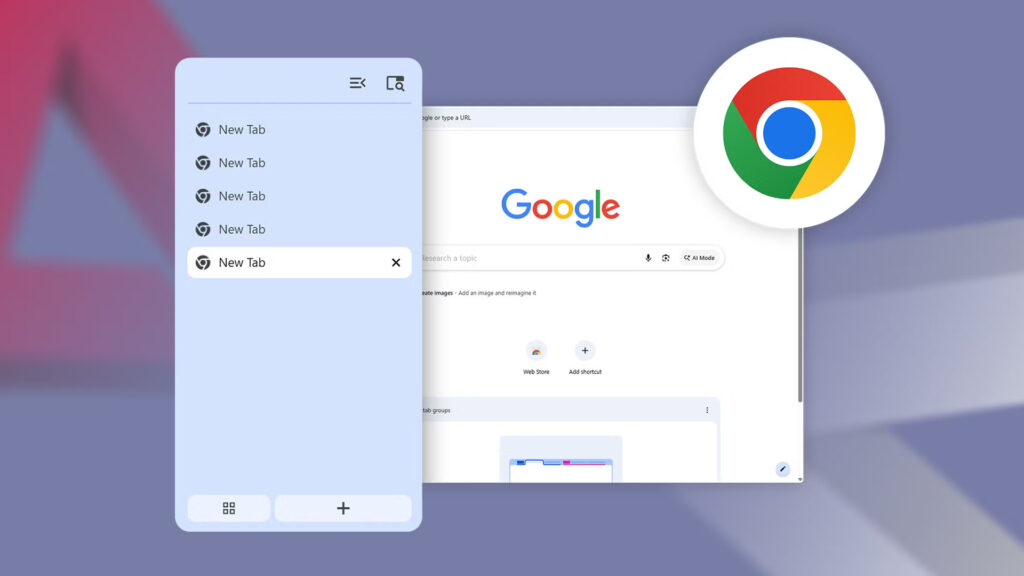
Google has officially started rolling out Google Chrome vertical tabs to desktop users worldwide. The feature, long requested by power users, moves tabs from the top to the left side of the browser. To enable it, simply right-click on any Chrome window and select “Show Tabs Vertically.”
Once enabled, vertical tabs become the default setting until the user switches back. This makes the change feel intentional and persistent, not just experimental. Each website’s title and favicon stay fully visible, since the tabs are no longer competing for limited horizontal space.
People who prefer vertical tabs tend to be power users or researchers who regularly keep many tabs open and struggle to find the right one. This is especially true when multiple tabs share the same website favicon. The feature is particularly useful on laptops with smaller displays where screen space matters most.
Growing interest in alternative browsers like Arc and AI-made tools pushed Google to move forward. The company tested vertical tabs years ago but never moved them out of beta. This time, Chrome Canary introduced the feature in November 2025 before Google rolled it out to everyone.
Alongside Google Chrome vertical tabs, Google is also rolling out a fully revamped Reading Mode with an immersive, full-page interface. Previously, Reading Mode only worked as a small side panel. Right-clicking on any webpage and selecting “Open in reading mode” now strips away ads, images, and distractions instantly.
Google says both new features are rolling out on the desktop version of Chrome starting now, and should reach all users soon. You can check by going to Settings > About Chrome and ensuring your browser is fully updated. According to Google’s official blog, the goal is to help users focus and boost productivity. TechCrunch reports that the rollout is gradual across all markets.